Connect sensors, actuators, and other devices to the internet for remote monitoring and control.


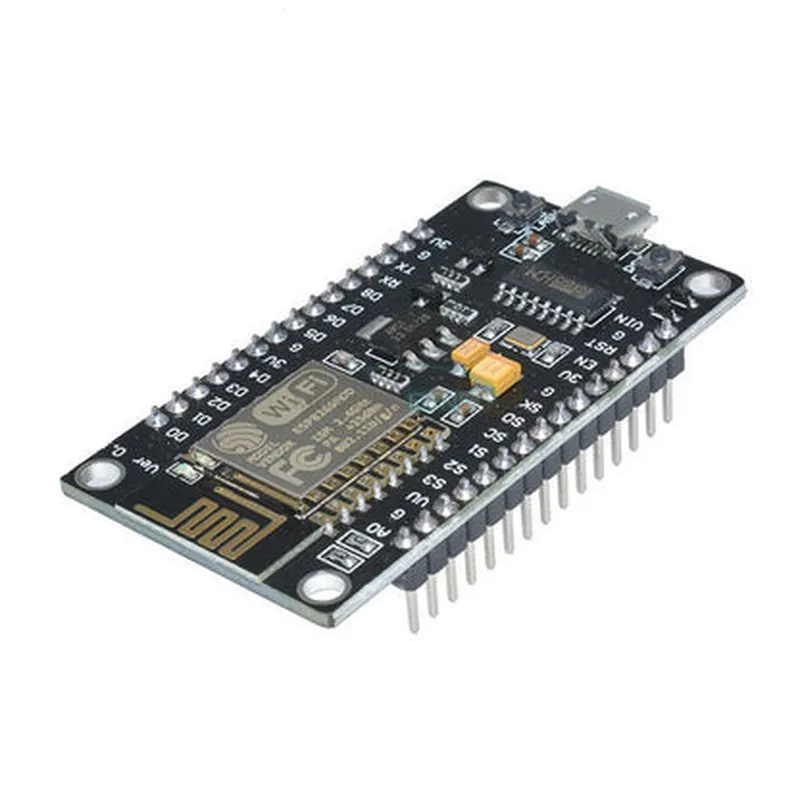
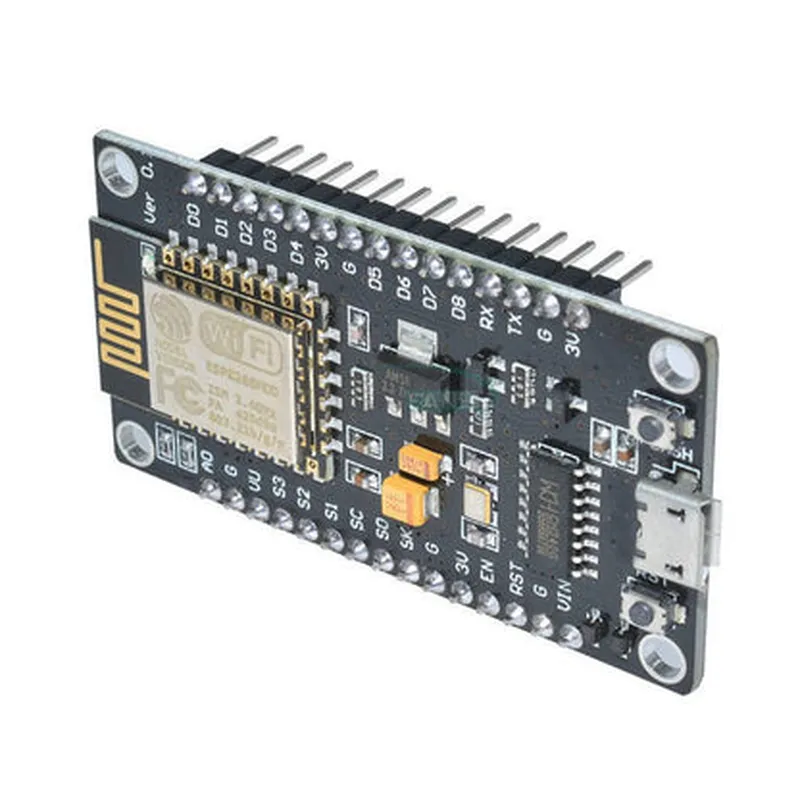
Connect sensors, actuators, and other devices to the internet for remote monitoring and control.
Use the board as the brain of your robot, leveraging Wi-Fi connectivity for remote control and sensor data transmission.
Control and monitor devices remotely using the board's Wi-Fi capabilities.
Key Features
32-bit LX6 microprocessor
4MB flash memory
96KB data RAM
64KB instruction RAM
Wi-Fi 802.11 b/g/n connectivity
Integrated low-power radio frequency (RF) front-end
Support for multiple Wi-Fi modes (STA, AP, STA+AP)
12 digital pins (GPIO0-11)
1 analog input pin (A0)
1 UART pin (UART0)
1 I2C pin (SCL)
1 I2C pin (SDA)
1 SPI pin (SCK)
1 SPI pin (MISO)
1 SPI pin (MOSI)
Onboard 5V to 3.3V voltage regulator
Supports external power supply (5V-12V) or USB power
Onboard 2.54mm pin headers for easy connection to breadboards or other devices
Support for OTA (Over-the-Air) firmware updates
Integrated Wi-Fi antenna
Compatible with Arduino IDE and other development platforms
Dimensions and Weight
49 x 24.5 mm (1.93 x 0.96 in)
approximately 10g (0.35 oz)
Operating Conditions
-20C to 85C (-4F to 185F)
5% to 95% RH (non-condensing)
Certifications and Compliance
FCC, CE, and RoHS compliant
Documentation and Resources
datasheets for ESP8266 SoC and LOLIN CH340 chip
Schematics and PCB design files
Arduino IDE and other development platform documentation
Purchasing and Support
Available for purchase from various online retailers and electronics suppliers
Community support and resources available through online forums and documentation portals
Node MCU ESP8266 V3 (LOLIN CH340 chip) DocumentationOverviewThe Node MCU ESP8266 V3 is a microcontroller board based on the popular ESP8266 system-on-a-chip (SoC) and features a LOLIN CH340 chip for USB-to-UART communication. This board is a cost-effective and compact solution for developing IoT projects, offering Wi-Fi connectivity, onboard USB programming, and a range of I/O interfaces.Key FeaturesESP8266 SoC with 32-bit LX6 microprocessor
LOLIN CH340 chip for USB-to-UART communication
4MB Flash memory
Wi-Fi 802.11 b/g/n
Onboard USB programming and debugging
17 GPIO pins (including 3.3V and GND)
Operating voltage: 3.3V
Dimensions: 49mm x 25mmCode Examples### Example 1: Wi-Fi Connectivity and HTTP RequestThis example demonstrates how to connect to a Wi-Fi network and send an HTTP request using the Node MCU ESP8266 V3.
```c
#include <WiFi.h>const char ssid = "your_wifi_ssid";
const char password = "your_wifi_password";
const char server = "http://example.com";WiFiClient client;void setup() {
Serial.begin(115200);
WiFi.begin(ssid, password);while (WiFi.status() != WL_CONNECTED) {
delay(1000);
Serial.println("Connecting to WiFi...");
}Serial.println("Connected to WiFi");
Serial.println("IP address: ");
Serial.println(WiFi.localIP());
}void loop() {
if (WiFi.status() == WL_CONNECTED) {
HTTPClient http;
http.begin(server);
int httpCode = http.GET();if (httpCode > 0) {
String response = http.getString();
Serial.println(response);
} else {
Serial.println("Error sending HTTP request");
}http.end();
}delay(10000);
}
```
In this example, the board connects to a Wi-Fi network using the `WiFi.begin()` function and then sends an HTTP request to a server using the `HTTPClient` library.### Example 2: Blinking LED and Serial CommunicationThis example demonstrates how to use the Node MCU ESP8266 V3 to blink an LED and communicate with a serial terminal.
```c
const int ledPin = 2; // GPIO2void setup() {
Serial.begin(115200);
pinMode(ledPin, OUTPUT);
}void loop() {
digitalWrite(ledPin, HIGH);
Serial.println("LED is ON");
delay(1000);digitalWrite(ledPin, LOW);
Serial.println("LED is OFF");
delay(1000);
}
```
In this example, the board blinks an LED connected to GPIO2 and sends a message to the serial terminal using the `Serial.println()` function.Additional Resources[ESP8266 Arduino Core](https://github.com/esp8266/Arduino)
[LOLIN CH340 Datasheet](https://www.wemos.cc/en/latest/ch340_ds.html)
[Node MCU ESP8266 V3 Schematic](https://github.com/nodemcu/nodemcu-devkit-v3/blob/master/schematics/NODEMCU_DEVKIT_V3.pdf)TroubleshootingMake sure to use the correct baud rate (115200) for serial communication.
Verify that the Wi-Fi credentials are correct and the network is available.
Check the LED pin connections and ensure that the LED is properly wired.