

Stufin
Home Quick Cart Profile

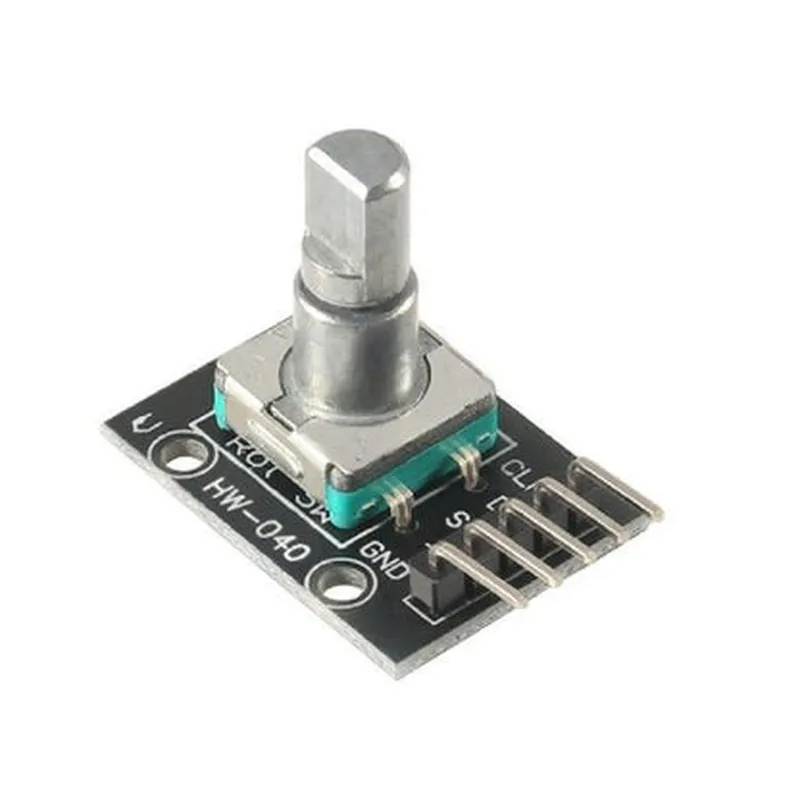
Rotary Encoder Module

Buy Now on Stufin

The Rotary Encoder Module performs the following functions

  • Rotational Movement Detection: The module detects the rotational movement of the mechanical shaft and converts it into digital signals.
  • Direction Detection: The module determines the direction of the rotation, whether it is clockwise or counterclockwise.
  • Position Tracking: The module tracks the position of the shaft, including the number of rotations and the absolute position.
  • Speed Measurement: The module can measure the rotational speed of the shaft.

Key Features

  • High Resolution: The Rotary Encoder Module provides high-resolution measurements, allowing for precise tracking of the shaft's rotational movement.
  • High Accuracy: The module offers high accuracy and reliability, even in applications with high vibration or shock.
  • Low Power Consumption: The module operates at low power consumption, making it suitable for battery-powered devices.
  • Simple Interface: The module provides a simple digital interface, allowing for easy connection to microcontrollers or other digital devices.
  • Compact Design: The module is designed to be compact and lightweight, making it ideal for applications where space is limited.
  • Multi-Channel Output: The module typically provides two or three output channels, allowing for the detection of both the rotation and direction of the shaft.
  • Adjustable Debouncing: The module often features adjustable debouncing, which allows users to set the debouncing time to suit their specific application.

Technical Specifications

Supply Voltage

3.3V or 5V (typically)

Input Resistance

10k (typically)

Output Type

Digital (TTL or CMOS compatible)

Resolution

12-bit to 24-bit (depending on the model)

Sampling Rate

Up to 10,000 RPM (depending on the model)

Operating Temperature

-20C to 80C (typically)

Applications

The Rotary Encoder Module is commonly used in

  • Robotics: To track the movement of robotic arms, grippers, or wheels.
  • Industrial Automation: To measure the position and speed of motors, conveyor belts, or other machinery.
  • Medical Devices: To track the movement of medical equipment, such as surgical instruments or hospital beds.
  • Gaming Consoles: To detect the movement of game controllers or other input devices.

Conclusion

The Rotary Encoder Module is a versatile and accurate component that provides reliable detection and tracking of rotational movement. Its high resolution, low power consumption, and compact design make it an ideal choice for a wide range of applications.

Pin Configuration

  • Rotary Encoder Module Documentation
  • Pin Description:
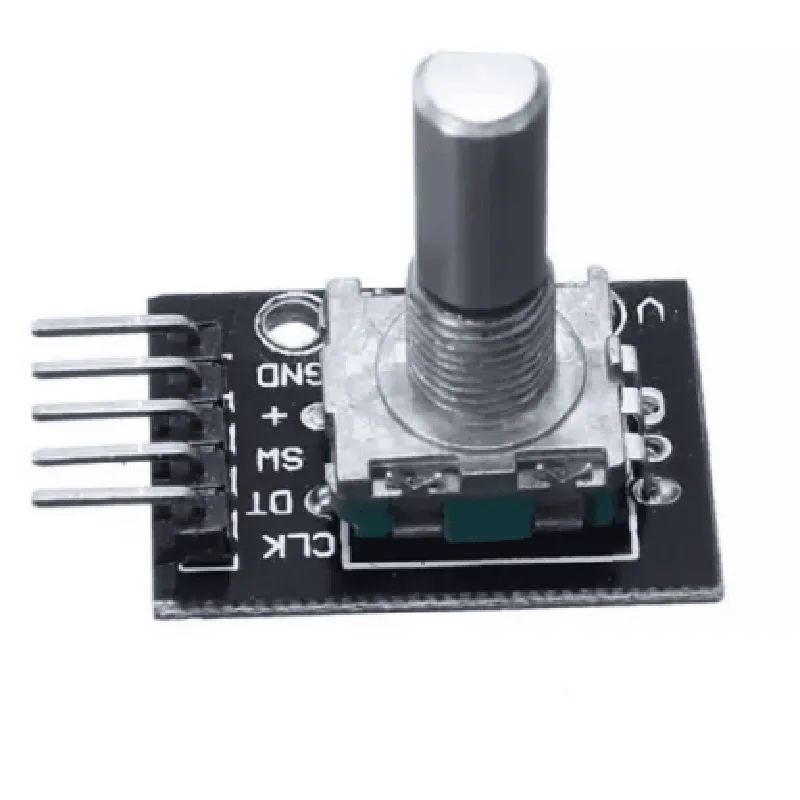
  • The Rotary Encoder Module has a total of 5 pins, which are used to connect the module to a microcontroller or other devices. Here's a detailed description of each pin:
  • 1. VCC (Power Supply) Pin:
  • Function: Provides power supply to the Rotary Encoder Module.
  • Voltage: Typically 3.3V or 5V, depending on the module's specifications.
  • Connection: Connect to a power supply source (e.g., Arduino's 5V pin or a battery) using a jumper wire.
  • 2. GND (Ground) Pin:
  • Function: Provides a ground connection for the Rotary Encoder Module.
  • Connection: Connect to a ground pin on the microcontroller or a common ground point using a jumper wire.
  • 3. CLK (Clock) Pin:
  • Function: Outputs clock pulses when the encoder shaft is rotated.
  • Signal: Digital signal (High/Low or 0/1 logic levels).
  • Connection: Connect to a digital input pin on the microcontroller (e.g., Arduino's digital pin 2) using a jumper wire.
  • 4. DT (Data) Pin:
  • Function: Outputs data pulses when the encoder shaft is rotated.
  • Signal: Digital signal (High/Low or 0/1 logic levels).
  • Connection: Connect to a digital input pin on the microcontroller (e.g., Arduino's digital pin 3) using a jumper wire.
  • 5. SW (Switch) Pin:
  • Function: Acts as a push-button switch when the encoder shaft is pressed.
  • Signal: Digital signal (High/Low or 0/1 logic levels).
  • Connection: Connect to a digital input pin on the microcontroller (e.g., Arduino's digital pin 4) using a jumper wire.
  • Connecting the Pins:
  • To connect the Rotary Encoder Module to a microcontroller (e.g., Arduino), follow this structure:
  • VCC -> 5V (Arduino's 5V pin)
  • GND -> GND (Arduino's GND pin)
  • CLK -> Digital Pin 2 (Arduino's digital pin 2)
  • DT -> Digital Pin 3 (Arduino's digital pin 3)
  • SW -> Digital Pin 4 (Arduino's digital pin 4)
  • Note: Make sure to check the datasheet of your specific Rotary Encoder Module for any variations in pinouts or recommended connections.
  • By following this documentation, you can correctly connect the Rotary Encoder Module to your microcontroller and start using it in your IoT projects.

Code Examples

Rotary Encoder Module Documentation
Overview
The Rotary Encoder Module is a versatile and widely used component in IoT projects, allowing users to measure rotational movement and angular displacement. This module is typically used in applications such as robotics, automation, and interactive systems.
Module Pinouts and Description
The Rotary Encoder Module typically consists of three pins:
CLK (Clock): Outputs a clock signal when the encoder is rotated.
 DT (Data): Outputs a digital signal indicating the direction of rotation.
 VCC: Power supply pin (usually 5V or 3.3V).
 GND: Ground pin.
Code Examples
### Example 1: Simple Rotary Encoder Reading with Arduino
This example demonstrates how to use the Rotary Encoder Module with an Arduino board to read the encoder's position and direction.
```arduino
const int clkPin = 2; // CLK pin connected to Arduino digital pin 2
const int dtPin = 3; // DT pin connected to Arduino digital pin 3
volatile int encoderPos = 0; // Encoder position variable
void setup() {
  pinMode(clkPin, INPUT);
  pinMode(dtPin, INPUT);
  attachInterrupt(digitalPinToInterrupt(clkPin), encoderISR, RISING);
  Serial.begin(9600);
}
void loop() {
  Serial.print("Encoder Position: ");
  Serial.println(encoderPos);
  delay(50);
}
void encoderISR() {
  if (digitalRead(dtPin) == HIGH) {
    encoderPos++; // Increment encoder position on clockwise rotation
  } else {
    encoderPos--; // Decrement encoder position on counterclockwise rotation
  }
}
```
### Example 2: Debouncing and Edge Detection with Raspberry Pi (Python)
This example demonstrates how to use the Rotary Encoder Module with a Raspberry Pi to debounce the encoder's output and detect rising and falling edges.
```python
import RPi.GPIO as GPIO
import time
# Set up GPIO pins
GPIO.setmode(GPIO.BCM)
clkPin = 17
dtPin = 23
GPIO.setup(clkPin, GPIO.IN, pull_up_down=GPIO.PUD_UP)
GPIO.setup(dtPin, GPIO.IN, pull_up_down=GPIO.PUD_UP)
encoderPos = 0
lastClkState = GPIO.input(clkPin)
lastDtState = GPIO.input(dtPin)
while True:
    clkState = GPIO.input(clkPin)
    dtState = GPIO.input(dtPin)
    
    # Debounce and edge detection
    if clkState != lastClkState:
        if clkState:
            if dtState:
                encoderPos += 1  # Increment on rising edge and HIGH DT state
            else:
                encoderPos -= 1  # Decrement on rising edge and LOW DT state
        lastClkState = clkState
    lastDtState = dtState
    
    print(f"Encoder Position: {encoderPos}")
    time.sleep(0.01)
```
Important Notes
The Rotary Encoder Module requires proper debouncing to prevent false readings.
 The examples provided are for demonstration purposes only and may need to be adapted to suit specific project requirements.
 Always ensure the module is properly connected to the microcontroller or single-board computer, and that the power supply and ground pins are correctly connected.