Stufin
Home Quick Cart Profile

ESP32 (38 Pin) WiFi + Bluetooth NodeMCU-32 Development Board


Buy Now on Stufin

Name

ESP32 (38 Pin) WiFi + Bluetooth NodeMCU-32 Development Board
Description

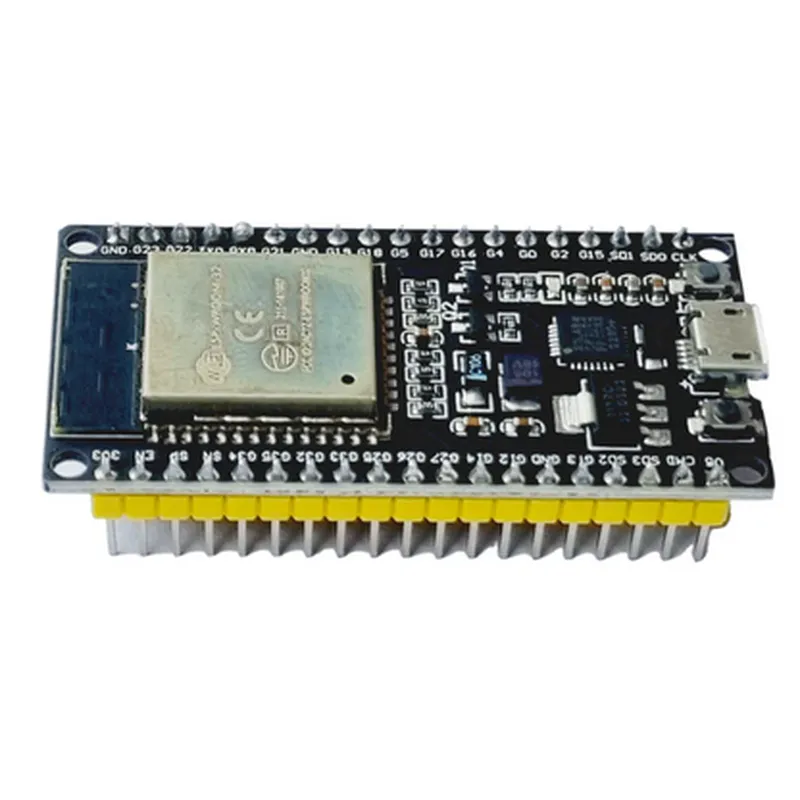
The ESP32 (38 Pin) WiFi + Bluetooth NodeMCU-32 Development Board is a microcontroller board based on the ESP32 system on a chip (SoC) from Espressif Systems. It is a popular and widely-used development board for IoT projects, robotics, and other applications that require wireless connectivity, processing power, and versatility.
Functionality

The ESP32 NodeMCU-32 Development Board is designed to provide a platform for developing a wide range of applications that require WiFi, Bluetooth, and microcontroller capabilities. It can be used for

Developing IoT projects that require wireless connectivity to the internet

Creating Bluetooth Low Energy (BLE) devices and peripherals

Building robotic systems that require wireless control and communication

Creating automation systems for home, industry, or other applications

Developing wearable devices and accessories

Key Features

### Hardware Features

Microcontroller

ESP32-D0WDQ6 SoC with Xtensa dual-core 32-bit LX6 microprocessor

Operating Frequency

80 MHz to 240 MHz

Memory

+ 520 KB SRAM

+ 4MB Flash Memory

Interfaces

+ 38 GPIO Pins

+ 2x UART

+ 1x SPI

+ 1x I2S

+ 1x I2C

+ 1x ADC

+ 2x DAC

Wireless Connectivity

+ WiFi 802.11 b/g/n/e/i

+ Bluetooth 4.2 BR/EDR and BLE

Power

+ Operating Voltage2.2V to 3.6V
+ Power Consumption< 1W

Other Features

+ Onboard CP2102 USB-to-UART Bridge for programming and debugging

+ Reset and Boot buttons

+ Power and Status LEDs

### Software Features

Programming Language

Compatible with MicroPython, C, and other programming languages

Development Environments

Supports Arduino IDE, ESP-IDF, and other development environments

Operating System

Supports ESP32-IDF, MicroPython, and other operating systems

APIs and Libraries

Supports various APIs and libraries for WiFi, Bluetooth, GPIO, and other features

### Other Features

Dimensions

48 mm x 30 mm (1.89 in x 1.18 in)

Weight

Approximately 10 grams

Mounting

Compatible with breadboards and PCBs

Certifications

Compatible with CE, FCC, and RoHS certifications

Conclusion

The ESP32 (38 Pin) WiFi + Bluetooth NodeMCU-32 Development Board is a powerful and feature-rich development board suitable for a wide range of applications that require wireless connectivity, processing power, and microcontroller capabilities. Its versatility, ease of use, and compatibility with various development environments make it a popular choice among IoT enthusiasts, hobbyists, and professionals.

Pin Configuration

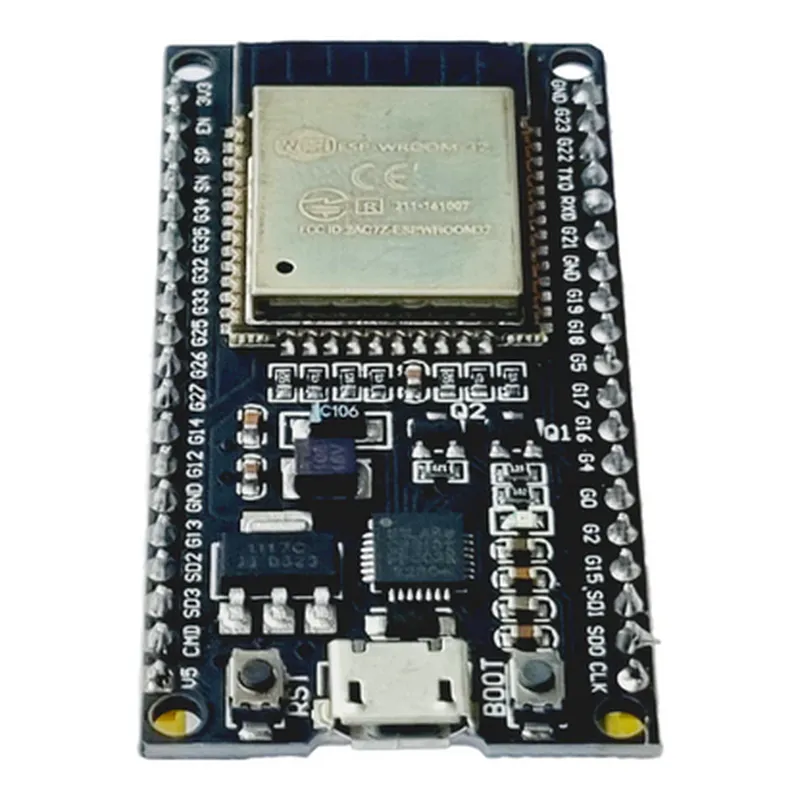
  • ESP32 (38 Pin) WiFi + Bluetooth NodeMCU-32 Development Board Pinout Guide
  • The ESP32 NodeMCU-32 Development Board is a popular IoT development platform that combines the power of WiFi and Bluetooth connectivity with a range of GPIO pins for interacting with the physical world. This guide provides a comprehensive overview of the 38 pins on the board, detailing their functions, types, and recommended usage.
  • Power Pins (3.3V, GND, Vin, EN)
  • 1. 3V3 (3.3V Power Pin): This pin provides a stable 3.3V power supply for the ESP32 microcontroller and other components on the board.
  • 2. GND (Ground Pin): This pin is connected to the ground plane of the board and provides a reference point for the circuit.
  • 3. Vin (Input Voltage Pin): This pin can be used to supply an external power source to the board, which will be regulated to 3.3V internally.
  • 4. EN (Enable Pin): This pin is used to enable or disable the internal voltage regulator. Connecting it to GND will disable the regulator, while connecting it to 3.3V will enable it.
  • GPIO Pins (D0-D27, CMD, CLK, SD0-SD3, CS)
  • The following pins are digital GPIO pins, which can be used for various purposes such as input/output, interrupt generation, PWM, I2C, SPI, and UART communication.
  • 5. D0 (GPIO0): General-purpose input/output pin, often used for debugging and programming.
  • 6. D1 (GPIO1): General-purpose input/output pin, often used for debugging and programming.
  • 7. D2 (GPIO2): General-purpose input/output pin, often used for I2C communication.
  • 8. D3 (GPIO3): General-purpose input/output pin, often used for I2C communication.
  • 9. D4 (GPIO4): General-purpose input/output pin, often used for SPI communication.
  • 10. D5 (GPIO5): General-purpose input/output pin, often used for SPI communication.
  • 11. D6 (GPIO6): General-purpose input/output pin, often used for SPI communication.
  • 12. D7 (GPIO7): General-purpose input/output pin, often used for SPI communication.
  • 13. D8 (GPIO8): General-purpose input/output pin, often used for UART communication.
  • 14. D9 (GPIO9): General-purpose input/output pin, often used for UART communication.
  • 15. D10 (GPIO10): General-purpose input/output pin, often used for SPI communication.
  • 16. D11 (GPIO11): General-purpose input/output pin, often used for SPI communication.
  • 17. D12 (GPIO12): General-purpose input/output pin, often used for I2S communication.
  • 18. D13 (GPIO13): General-purpose input/output pin, often used for I2S communication.
  • 19. D14 (GPIO14): General-purpose input/output pin, often used for HSPI communication.
  • 20. D15 (GPIO15): General-purpose input/output pin, often used for HSPI communication.
  • 21. D16 (GPIO16): General-purpose input/output pin, often used for I2C communication.
  • 22. D17 (GPIO17): General-purpose input/output pin, often used for I2C communication.
  • 23. D18 (GPIO18): General-purpose input/output pin, often used for SPI communication.
  • 24. D19 (GPIO19): General-purpose input/output pin, often used for SPI communication.
  • 25. D20 (GPIO20): General-purpose input/output pin, often used for I2S communication.
  • 26. D21 (GPIO21): General-purpose input/output pin, often used for I2S communication.
  • 27. D22 (GPIO22): General-purpose input/output pin, often used for UART communication.
  • 28. D23 (GPIO23): General-purpose input/output pin, often used for UART communication.
  • 29. D24 (GPIO24): General-purpose input/output pin, often used for SPI communication.
  • 30. D25 (GPIO25): General-purpose input/output pin, often used for SPI communication.
  • 31. D26 (GPIO26): General-purpose input/output pin, often used for I2C communication.
  • 32. D27 (GPIO27): General-purpose input/output pin, often used for I2C communication.
  • 33. CMD (Command Pin): This pin is used for SPI communication and is typically used as the command or chip select pin.
  • 34. CLK (Clock Pin): This pin is used for SPI communication and is typically used as the clock pin.
  • 35. SD0 (SPI Data Pin 0): This pin is used for SPI communication and is typically used as the MOSI (Master Out Slave In) pin.
  • 36. SD1 (SPI Data Pin 1): This pin is used for SPI communication and is typically used as the MISO (Master In Slave Out) pin.
  • 37. SD2 (SPI Data Pin 2): This pin is used for SPI communication and is typically used as the WP (Write Protect) pin.
  • 38. SD3 (SPI Data Pin 3): This pin is used for SPI communication and is typically used as the HOLD pin.
  • 39. CS (Chip Select Pin): This pin is used for SPI communication and is typically used as the chip select pin.
  • Additional pins
  • UART (UART TX/RX Pins): These pins are used for UART communication and can be configured as RX and TX pins.
  • I2C (I2C SCL/SDA Pins): These pins are used for I2C communication and can be configured as SCL and SDA pins.
  • When connecting pins, ensure that:
  • You use the correct pin diagram for your specific board revision.
  • You do not exceed the maximum current rating for each pin (typically 20-30mA).
  • You use a suitable voltage level for the connected device (3.3V for most ESP32 pins).
  • You follow proper wiring and soldering practices to avoid damage to the board or connected components.
  • Remember to consult the official ESP32 documentation and datasheets for more detailed information on pin functionality, electrical characteristics, and usage guidelines.

Code Examples

ESP32 (38 Pin) WiFi + Bluetooth NodeMCU-32 Development Board Documentation
Overview
The ESP32 (38 Pin) WiFi + Bluetooth NodeMCU-32 Development Board is a microcontroller board based on the ESP32 system-on-chip (SoC) from Espressif Systems. This board integrates WiFi and Bluetooth capabilities, making it an ideal choice for IoT projects. The NodeMCU-32 development board provides a user-friendly platform for developers to explore the features of the ESP32 chip.
Key Features
ESP32 SoC with dual-core 32-bit LX6 microprocessor
 38 pinout compatible with breadboards and perfboards
 WiFi 802.11 b/g/n and Bluetooth 4.2 capabilities
 520 KB of SRAM and 4 MB of flash memory
 USB-to-UART bridge for programming and debugging
 Operating voltage: 3.3 V
 Supports programming languages like C, C++, MicroPython, and Lua
Pinout
The ESP32 NodeMCU-32 development board has a 38-pinout, which is compatible with breadboards and perfboards. The pinout includes:
GPIO pins (0-37)
 3.3 V and GND pins
 USB-to-UART bridge pins
 WiFi and Bluetooth antenna pins
Code Examples
### Example 1: Connecting to WiFi and Sending Data to a Server
This example demonstrates how to connect to a WiFi network and send data to a server using the ESP32 NodeMCU-32 development board. We will use the `WiFi` and `HTTPClient` libraries to establish a connection and send a GET request to a server.
Code
```c
#include <WiFi.h>
#include <HTTPClient.h>
const char ssid = "your_wifi_ssid";
const char password = "your_wifi_password";
const char serverUrl = "http://example.com/data";
WiFiClient espClient;
HTTPClient http;
void setup() {
  Serial.begin(115200);
// Connect to WiFi
  WiFi.begin(ssid, password);
  while (WiFi.status() != WL_CONNECTED) {
    delay(1000);
    Serial.println("Connecting to WiFi...");
  }
  Serial.println("Connected to WiFi");
  Serial.println("MAC address: ");
  Serial.println(WiFi.macAddress());
// Send data to server
  http.begin(espClient, serverUrl);
  int httpResponseCode = http.GET();
  if (httpResponseCode > 0) {
    String response = http.getString();
    Serial.println(response);
  } else {
    Serial.println("Error sending data to server");
  }
  http.end();
}
void loop() {
  delay(10000);
}
```
### Example 2: Bluetooth Low Energy (BLE) Peripheral
This example demonstrates how to use the ESP32 NodeMCU-32 development board as a Bluetooth Low Energy (BLE) peripheral. We will create a BLE service that exposes a characteristic that can be read and written by a connected device.
Code
```c
#include <BLE.h>
BLEService service("180F"); // Generic Access Service
BLECharacteristic characteristic("2A19", BLECharacteristic::PROPERTY_READ | BLECharacteristic::PROPERTY_WRITE, "Data");
void setup() {
  Serial.begin(115200);
// Initialize BLE
  BLE.begin();
// Set device name and appearance
  BLE.setDeviceName("ESP32 BLE Peripheral");
  BLE.setAppearance(BLE_APPEARANCE_GENERIC_TAG);
// Add service and characteristic
  BLE.addService(service);
  service.addCharacteristic(characteristic);
// Start advertising
  BLE.advertise();
  Serial.println("BLE peripheral started...");
}
void loop() {
  // Handle BLE events
  BLE.run();
}
```
### Example 3: MicroPython Example - Blinking an LED
This example demonstrates how to use MicroPython on the ESP32 NodeMCU-32 development board to blink an LED connected to GPIO pin 2.
Code
```python
import machine
import utime
# Set up LED pin as output
led = machine.Pin(2, machine.Pin.OUT)
while True:
    # Toggle LED state
    led.value(not led.value())
    utime.sleep(0.5)
```
Note: Make sure to save this code as `main.py` on the ESP32 board's file system, and restart the board to run the script.