Stufin
Home Quick Cart Profile

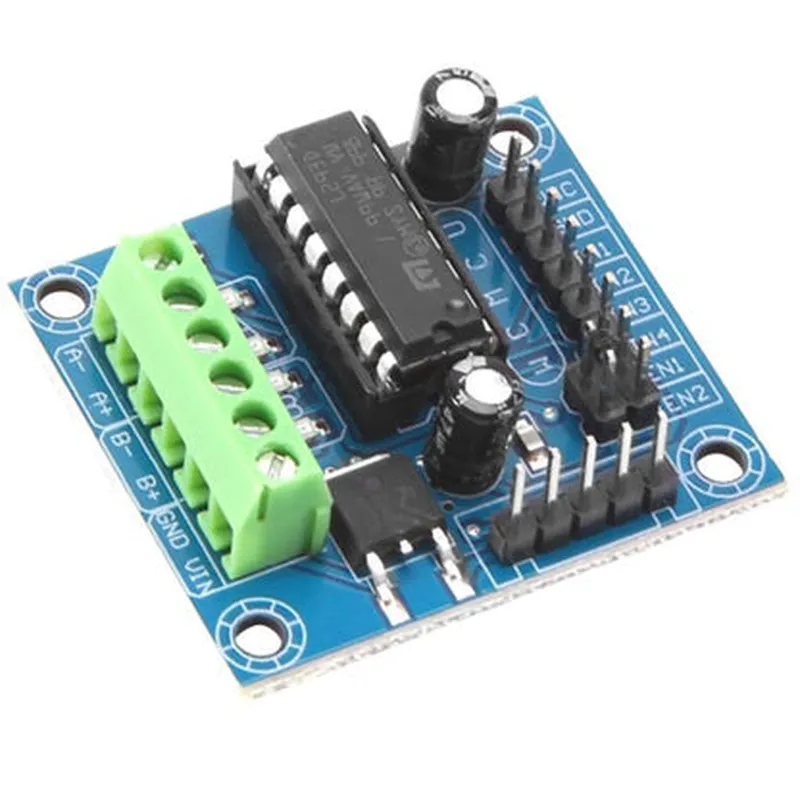
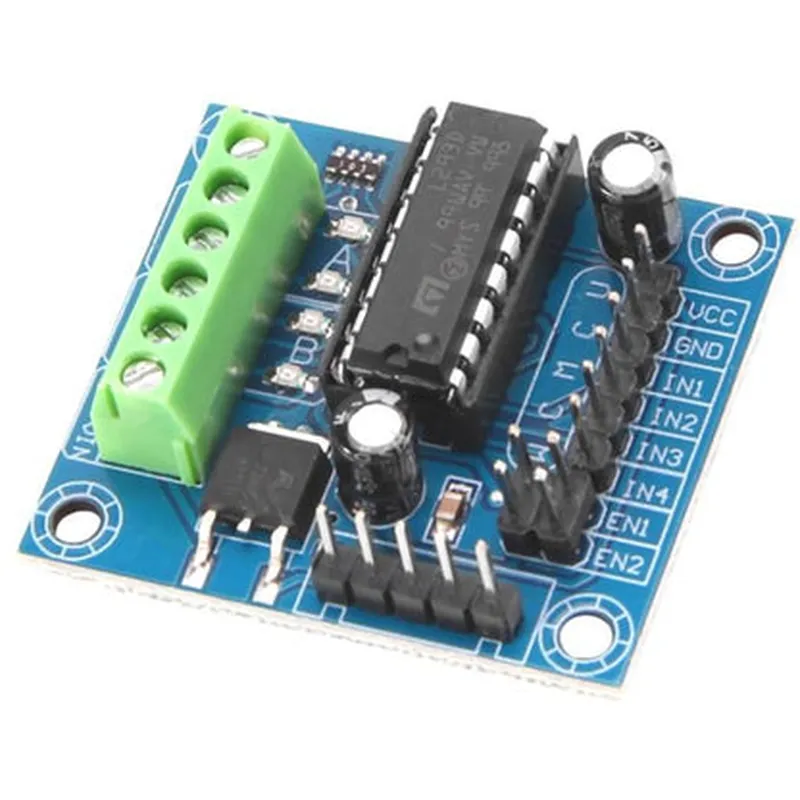
L293D 4 Channel DC Motor Driver

Buy Now on Stufin

Pin Configuration

  • L293D 4 Channel DC Motor Driver Documentation
  • Pinout Explanation
  • The L293D 4 Channel DC Motor Driver IC has 16 pins, which can be divided into four quadrants: two input quadrants, two enable quadrants, and two output quadrants. The pinout explanation is as follows:
  • Input Quadrants (Pins 1-4 and 9-12)
  • Pin 1 (1A): Input 1 for Motor 1 (Channel 1)
  • Pin 2 (1B): Input 2 for Motor 1 (Channel 1)
  • Pin 3 (2A): Input 1 for Motor 2 (Channel 2)
  • Pin 4 (2B): Input 2 for Motor 2 (Channel 2)
  • Pin 9 (3A): Input 1 for Motor 3 (Channel 3)
  • Pin 10 (3B): Input 2 for Motor 3 (Channel 3)
  • Pin 11 (4A): Input 1 for Motor 4 (Channel 4)
  • Pin 12 (4B): Input 2 for Motor 4 (Channel 4)
  • These input pins receive signals from a microcontroller or other control devices to control the direction and speed of the connected motors.
  • Enable Quadrants (Pins 5 and 13)
  • Pin 5 (1, 2 EN): Enable input for Motors 1 and 2 (Channels 1 and 2)
  • Pin 13 (3, 4 EN): Enable input for Motors 3 and 4 (Channels 3 and 4)
  • These enable pins are used to enable or disable the motor drivers. When the enable pin is high, the motor driver is enabled, and when it's low, the motor driver is disabled.
  • Output Quadrants (Pins 6-8 and 14-16)
  • Pin 6 (OUT1): Output 1 for Motor 1 (Channel 1)
  • Pin 7 (OUT2): Output 2 for Motor 1 (Channel 1)
  • Pin 8 (OUT3): Output 1 for Motor 2 (Channel 2)
  • Pin 14 (OUT4): Output 2 for Motor 2 (Channel 2)
  • Pin 15 (OUT5): Output 1 for Motor 3 (Channel 3)
  • Pin 16 (OUT6): Output 2 for Motor 3 (Channel 3)
  • Pin 7 (OUT7): Output 1 for Motor 4 (Channel 4)
  • Pin 8 (OUT8): Output 2 for Motor 4 (Channel 4)
  • These output pins connect to the motors and provide the necessary current and voltage to drive them.
  • Power Pins
  • Pin 8 (VCC): Positive power supply (typically 5V)
  • Pin 16 (VCC2): Positive power supply for the internal logic (typically 5V)
  • Pin 4 (GND): Ground
  • Pin 5 (GND2): Ground for the internal logic
  • Connection Structure
  • To connect the L293D 4 Channel DC Motor Driver, follow these steps:
  • 1. Connect the power supply:
  • Connect the positive power supply (5V) to Pin 8 (VCC) and Pin 16 (VCC2).
  • Connect the ground (GND) to Pin 4 (GND) and Pin 5 (GND2).
  • 2. Connect the motor inputs:
  • Connect the inputs from your microcontroller or control device to the input pins (1-4 and 9-12).
  • 3. Connect the enable inputs:
  • Connect the enable signals from your microcontroller or control device to the enable pins (Pin 5 and Pin 13).
  • 4. Connect the motor outputs:
  • Connect the motor outputs to the output pins (6-8 and 14-16).
  • Make sure to connect the correct motor wires to the correct output pins (e.g., OUT1 and OUT2 for Motor 1).
  • 5. Connect the motors:
  • Connect the motors to the output pins, following the correct motor wiring (e.g., Motor 1 to OUT1 and OUT2).
  • Important Notes
  • The L293D can handle a maximum current of 1A per channel, so ensure your motors do not exceed this current rating.
  • The IC requires a heat sink for proper heat dissipation, especially when driving high-current motors.
  • Use a suitable capacitor across the power supply lines to filter out noise and ensure stable operation.
  • By following this connection structure and taking note of the important considerations, you can effectively use the L293D 4 Channel DC Motor Driver to control your motors in your IoT project.

Code Examples

L293D 4 Channel DC Motor Driver Documentation
Overview
The L293D is a quadruple high-current half-H driver designed to provide bidirectional drive currents up to 1A at voltages from 4.5V to 36V. It is commonly used to control DC motors, solenoids, and other high-current devices in robotics, automation, and IoT applications. This documentation provides a comprehensive guide on how to use the L293D 4 Channel DC Motor Driver, including code examples for various contexts.
Pinout and Connection Diagram
The L293D has a total of 16 pins, with the following connections:
VCC (Pin 8): Power supply voltage (4.5V to 36V)
 GND (Pin 4, 5, 12, and 13): Ground connections
 EN1 and EN2 (Pins 1 and 9): Enable inputs for motor channels 1-2 and 3-4, respectively
 IN1-IN4 (Pins 2, 7, 10, and 15): Input control signals for motor channels 1-4
 OUT1-OUT4 (Pins 3, 6, 11, and 14): Output connections for motor channels 1-4
Code Examples
### Example 1: Basic DC Motor Control using Arduino
In this example, we will use the L293D to control a single DC motor using an Arduino Board. We will connect the motor to OUT1 and OUT2, and use the IN1 and IN2 inputs to control the motor's direction and speed.
```c++
const int EN1 = 2;  // Enable input for motor channel 1
const int IN1 = 3;  // Input control signal for motor channel 1
const int IN2 = 4;  // Input control signal for motor channel 1
void setup() {
  pinMode(EN1, OUTPUT);
  pinMode(IN1, OUTPUT);
  pinMode(IN2, OUTPUT);
}
void loop() {
  // Set the enable input high to enable the motor
  digitalWrite(EN1, HIGH);
  
  // Set the motor to rotate clockwise
  digitalWrite(IN1, HIGH);
  digitalWrite(IN2, LOW);
  delay(1000);
  
  // Set the motor to rotate counter-clockwise
  digitalWrite(IN1, LOW);
  digitalWrite(IN2, HIGH);
  delay(1000);
  
  // Stop the motor
  digitalWrite(IN1, LOW);
  digitalWrite(IN2, LOW);
  delay(1000);
}
```
### Example 2: Controlling Multiple DC Motors using Raspberry Pi and Python
In this example, we will use the L293D to control two DC motors using a Raspberry Pi and Python. We will connect the motors to OUT1-OUT2 and OUT3-OUT4, and use the IN1-IN4 inputs to control the motors' direction and speed.
```python
import RPi.GPIO as GPIO
import time
# Set up GPIO mode
GPIO.setmode(GPIO.BCM)
# Define the GPIO pins for the L293D
EN1 = 17
IN1 = 23
IN2 = 24
EN2 = 27
IN3 = 22
IN4 = 25
# Set up GPIO pins as outputs
GPIO.setup(EN1, GPIO.OUT)
GPIO.setup(IN1, GPIO.OUT)
GPIO.setup(IN2, GPIO.OUT)
GPIO.setup(EN2, GPIO.OUT)
GPIO.setup(IN3, GPIO.OUT)
GPIO.setup(IN4, GPIO.OUT)
while True:
  # Set motor 1 to rotate clockwise
  GPIO.output(EN1, GPIO.HIGH)
  GPIO.output(IN1, GPIO.HIGH)
  GPIO.output(IN2, GPIO.LOW)
  time.sleep(1)
  
  # Set motor 1 to rotate counter-clockwise
  GPIO.output(IN1, GPIO.LOW)
  GPIO.output(IN2, GPIO.HIGH)
  time.sleep(1)
  
  # Stop motor 1
  GPIO.output(IN1, GPIO.LOW)
  GPIO.output(IN2, GPIO.LOW)
  
  # Set motor 2 to rotate clockwise
  GPIO.output(EN2, GPIO.HIGH)
  GPIO.output(IN3, GPIO.HIGH)
  GPIO.output(IN4, GPIO.LOW)
  time.sleep(1)
  
  # Set motor 2 to rotate counter-clockwise
  GPIO.output(IN3, GPIO.LOW)
  GPIO.output(IN4, GPIO.HIGH)
  time.sleep(1)
  
  # Stop motor 2
  GPIO.output(IN3, GPIO.LOW)
  GPIO.output(IN4, GPIO.LOW)
```
Note: The above code examples are for illustrative purposes only and may require modification to suit your specific application. Ensure you follow proper safety precautions and voltage ratings when working with the L293D and DC motors.