The temperature control unit allows users to set the desired temperature between 150C to 450C (302F to 842F) with an accuracy of 1C (1.8F).


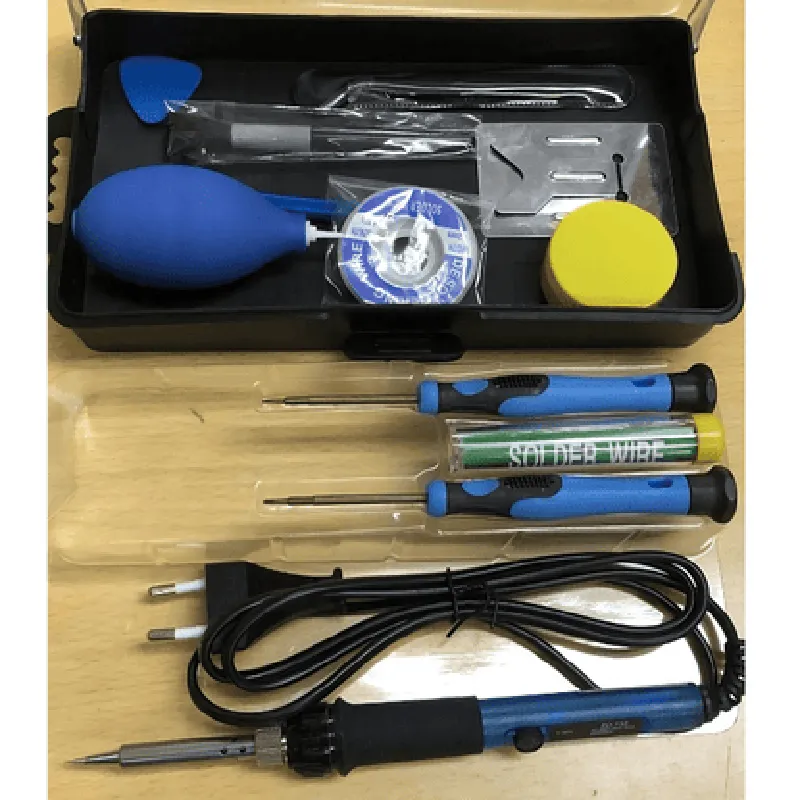
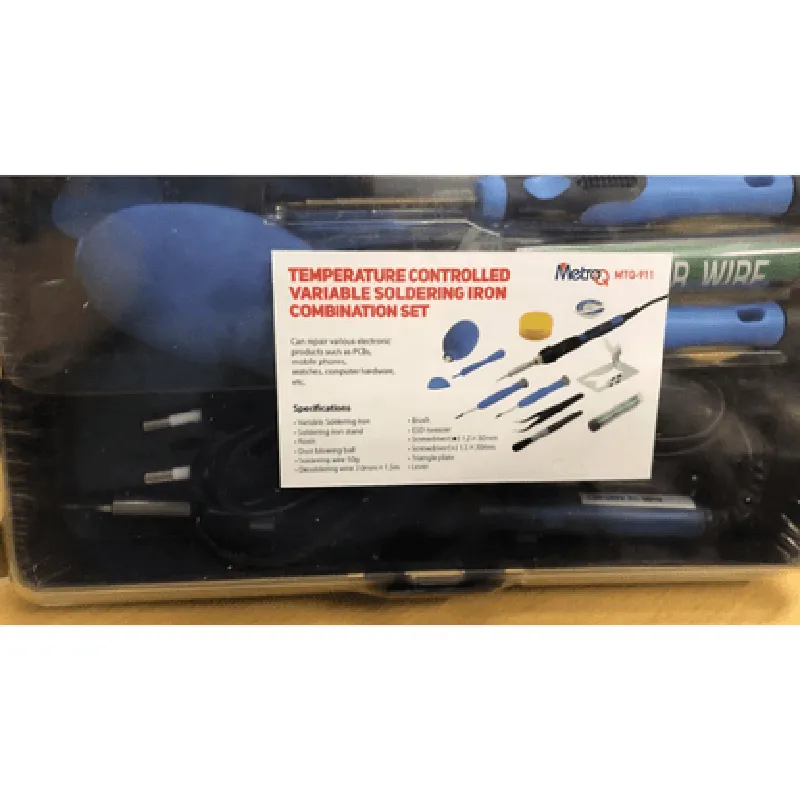
The temperature control unit allows users to set the desired temperature between 150C to 450C (302F to 842F) with an accuracy of 1C (1.8F).
The soldering iron's power output can be adjusted to accommodate different soldering tasks, ensuring optimal performance and preventing overheating.
The soldering iron's design allows for rapid heat recovery, reducing downtime and increasing productivity.
The set includes multiple interchangeable tips, enabling users to adapt to different soldering tasks and component sizes.
Key Features
| The MTQ911 Temperature Controlled Variable Soldering Iron Combination Set offers the following key features |
A clear, backlit LCD display shows the current temperature, allowing users to monitor and adjust the temperature as needed.
A temperature lock feature ensures that the set temperature is maintained, preventing accidental changes during operation.
| Auto-Shutdown | The temperature control unit features an auto-shutdown function, automatically turning off the soldering iron when not in use to conserve energy and prolong its lifespan. |
The set includes multiple safety features, such as overheat protection, short-circuit protection, and durable heat-resistant cables to ensure safe operation.
The temperature control unit and soldering iron are designed to be compact and portable, making the set ideal for use in small workspaces or on-the-go applications.
The set includes multiple interchangeable tips, a soldering iron stand, and a user manual, providing users with everything needed to get started.
Technical Specifications
Soldering Iron
| + Power | 60W |
| + Temperature Range | 150C to 450C (302F to 842F) |
| + Tip diameter | 0.5mm to 3.0mm (0.02" to 0.12") |
Temperature Control Unit
| + Input Voltage | 100-240VAC, 50-60Hz |
| + Output Voltage | 24VDC |
| + Temperature Accuracy | 1C (1.8F) |
| + Display | Backlit LCD display |
Dimensions
| + Temperature Control Unit | 120mm x 80mm x 50mm (4.7" x 3.1" x 2.0") |
| + Soldering Iron | 250mm x 30mm x 30mm (9.8" x 1.2" x 1.2") |
Application
| The MTQ911 Temperature Controlled Variable Soldering Iron Combination Set is suitable for a wide range of applications, including |
Electronic repair and maintenance
Prototyping and development
PCB assembly and rework
Jewelry making and craft applications
Industrial manufacturing and quality control
MTQ911 Temperature Controlled Variable Soldering Iron Combination Set DocumentationOverviewThe MTQ911 Temperature Controlled Variable Soldering Iron Combination Set is a versatile IoT component designed for precision soldering applications. This set includes a temperature-controlled soldering iron, a power supply, and a temperature sensor. The MTQ911 can be used in various contexts, including industrial automation, robotics, and DIY electronics projects.Technical SpecificationsTemperature Range: 150C to 450C
Temperature Accuracy: 2C
Power Supply: 24V DC, 60W
Interface: UART (RX/TX) and Analog Output (0-5V)
Dimensions: 150mm x 80mm x 50mm (soldering iron), 100mm x 70mm x 50mm (power supply)Communication ProtocolThe MTQ911 communicates via UART (RX/TX) at a baud rate of 9600. The device responds to ASCII commands and returns temperature values in Celsius.Code Examples### Example 1: Temperature Control using UART (Arduino)This example demonstrates how to use the MTQ911 with an Arduino board to control the soldering iron's temperature.```cpp
#include <SoftwareSerial.h>SoftwareSerial mySerial(2, 3); // RX, TXvoid setup() {
mySerial.begin(9600);
Serial.begin(9600);
}void loop() {
// Set temperature to 350C
mySerial.println("T350");
delay(1000);// Read temperature
mySerial.println("RT");
char temp_str[6];
mySerial.readBytesUntil('
', temp_str, 6);
Serial.println("Temperature: ");
Serial.println(temp_str);delay(1000);
}
```### Example 2: Analog Output Temperature Monitoring (Raspberry Pi)This example shows how to use the MTQ911's analog output to monitor the temperature using a Raspberry Pi.```python
import time
import board
import busio
import adafruit_ads1x15.ads1015 as ADS# Set up ADC
i2c = busio.I2C(board.SCL, board.SDA)
ads = ADS.ADS1015(i2c)while True:
# Read analog temperature value (0-5V)
temp_voltage = ads.read_adc(0)# Convert voltage to temperature (assuming 10mV/C)
temp_celsius = temp_voltage 500 / 1023print("Temperature: {:.2f}C".format(temp_celsius))time.sleep(1)
```Note: In this example, an external ADC (ADS1015) is used to read the analog output from the MTQ911. The ADAFruit library is used to interact with the ADC.### Example 3: IoT Integration (Node-RED)This example demonstrates how to integrate the MTQ911 with Node-RED, a popular IoT development platform.```json
[
{
"id": "mtq911-uart",
"type": "serial in",
"z": "2",
"name": "",
"serial": "UART",
"uart": "UART0",
"baudrate": "9600",
"parity": "none",
"bits": 8,
"stopbits": 1,
"x": 100,
"y": 100,
"wires": [["mtq911-temp"]]
},
{
"id": "mtq911-temp",
"type": "function",
"z": "2",
"name": "",
"func": "msg.payload = isNaN(parseInt(msg.payload)) ? null : parseInt(msg.payload);
return msg;",
"outputs": 1,
"noerr": 0,
"initialize": "",
"finalize": "",
"x": 250,
"y": 100,
"wires": [["debug-temp"]]
},
{
"id": "debug-temp",
"type": "debug",
"z": "2",
"name": "",
"active": true,
"tosidebar": true,
"console": false,
"tostatus": false,
"complete": "payload",
"x": 400,
"y": 100,
"wires": []
}
]
```In this example, Node-RED is used to read the temperature value from the MTQ911 via UART and display it in the debug console.These examples demonstrate the versatility of the MTQ911 Temperature Controlled Variable Soldering Iron Combination Set and its potential applications in various IoT contexts.