Stufin
Home Quick Cart Profile

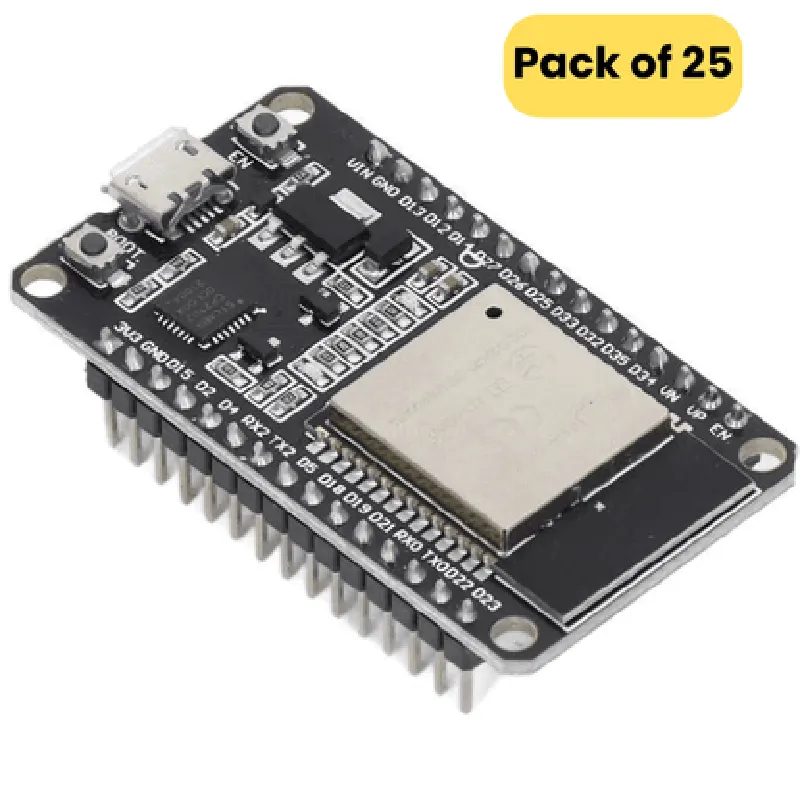
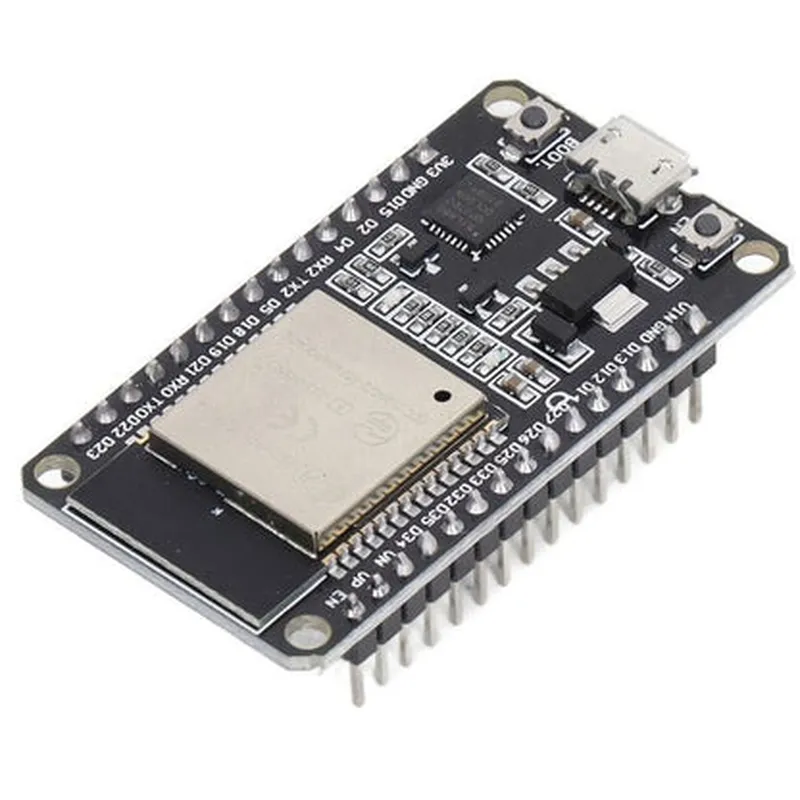
ESP32 Node MCU Development Board with Wifi and Bluetooth (CP2102 Driver, 30 PIN) (Pack of 25)

Buy Now on Stufin

Key Features

### Microcontroller

The board is based on the ESP32 system-on-a-chip (SoC), which combines a microcontroller, Wi-Fi, and Bluetooth capabilities in a single chip.

The ESP32 microcontroller features a dual-core 32-bit LX6 microprocessor, operating at 160 MHz.

### Wireless Connectivity
Wi-FiThe board supports 802.11 b/g/n Wi-Fi, allowing for fast and reliable wireless networking.

Bluetooth

The board features Bluetooth 4.2, enabling wireless communication with Bluetooth-enabled devices.

### Programmability

The board can be programmed using the Arduino IDE, MicroPython, or Lua, making it accessible to developers with varying levels of experience.

The board supports Over-The-Air (OTA) programming, allowing for wireless firmware updates.

### Peripherals and Interfaces

USB Interface

The board features a USB interface, enabled by the CP2102 driver, for programming and debugging.

GPIO

The board provides 30 GPIO pins, which can be used for connecting sensors, actuators, and other peripherals.

UART, SPI, I2C, I2S, and SD Card InterfacesThe board supports various serial interfaces, including UART, SPI, I2C, I2S, and SD Card interfaces, for connecting and communicating with external devices.
### Power Management

Power Supply

The board can be powered via USB or an external power source (3.3V to 5V).

Low Power Consumption

The ESP32 chip is designed for low power consumption, making it suitable for battery-powered IoT applications.

### Other Features
On-Board AntennasThe board features on-board antennas for Wi-Fi and Bluetooth, ensuring reliable wireless connectivity.

Reset and Boot Buttons

The board provides reset and boot buttons for easy debugging and recovery.

Dimensions

53 mm x 43 mm (2.09 in x 1.69 in)

Weight

25 grams (0.88 oz) per unit

Operating Temperature

-20C to 85C (-4F to 185F)

Storage Temperature

-40C to 125C (-40F to 257F)

What's in the Box

25 x ESP32 Node MCU Development Boards with Wifi and Bluetooth (CP2102 Driver, 30 PIN)

Ideal Applications

IoT development projects

Robotics and automation

Home automation

Wearable devices

Industrial control systems

Prototyping and proof-of-concept development

Note

The CP2102 driver is a software component that enables the USB interface on the board. It is essential to install the CP2102 driver on your computer before using the board.

Pin Configuration

  • ESP32 Node MCU Development Board with Wifi and Bluetooth (CP2102 Driver, 30 PIN) Pinout Guide
  • The ESP32 Node MCU Development Board is a powerful IoT development platform that integrates Wi-Fi and Bluetooth capabilities. This guide provides a detailed explanation of the 30-pin layout, outlining the function of each pin.
  • Pin Diagram:
  • Before we dive into the pin-by-pin explanation, here is a visual representation of the ESP32 Node MCU Development Board pinout:
  • ```
  • +---------------+
  • | 1 | 2 | 3 | 4 | 5 |
  • |----|----|----|----|----|
  • | 6 | 7 | 8 | 9 | 10 |
  • |----|----|----|----|----|
  • | 11 | 12 | 13 | 14 | 15 |
  • |----|----|----|----|----|
  • | 16 | 17 | 18 | 19 | 20 |
  • |----|----|----|----|----|
  • | 21 | 22 | 23 | 24 | 25 |
  • |----|----|----|----|----|
  • | 26 | 27 | 28 | 29 | 30 |
  • +---------------+
  • ```
  • Pin-by-Pin Explanation:
  • Here's a detailed explanation of each pin, organized by category:
  • Power Pins (1-4, 26-27):
  • VCC (1): Positive power supply pin. Connect to a 3.3V power source.
  • GND (2): Ground pin. Connect to the negative terminal of the power source.
  • 3V3 (3): Regulated 3.3V output pin. Can be used to power external components.
  • GND (4): Additional ground pin.
  • VIN (26): Input voltage pin. Connect to an external power source (3.3V to 6V).
  • GND (27): Additional ground pin.
  • Digital Pins (5-25):
  • D0/RX0 (5): UART0 receive pin. Used for serial communication.
  • D1/TX0 (6): UART0 transmit pin. Used for serial communication.
  • D2 (7): Digital input/output pin.
  • D3 (8): Digital input/output pin.
  • D4 (9): Digital input/output pin.
  • D5 (10): Digital input/output pin.
  • D6 (11): Digital input/output pin.
  • D7 (12): Digital input/output pin.
  • D8 (13): Digital input/output pin.
  • D9 (14): Digital input/output pin.
  • D10 (15): Digital input/output pin.
  • D11 (16): Digital input/output pin.
  • D12 (17): Digital input/output pin.
  • D13 (18): Digital input/output pin.
  • D14 (19): Digital input/output pin.
  • D15 (20): Digital input/output pin.
  • D16 (21): Digital input/output pin.
  • D17 (22): Digital input/output pin.
  • D18 (23): Digital input/output pin.
  • D19 (24): Digital input/output pin.
  • D20 (25): Digital input/output pin.
  • Analog Pins (28-29):
  • A0 (28): Analog input pin. Can be used for analog-to-digital conversion.
  • A1 (29): Analog input pin. Can be used for analog-to-digital conversion.
  • Special Pins (30):
  • EN (30): Enable pin. Pull-low to reset the ESP32 module.
  • Additional Features:
  • CP2102 USB-to-UART Bridge: A built-in USB-to-UART bridge allows for easy programming and debugging of the ESP32 module.
  • Wi-Fi and Bluetooth Antennas: The board features integrated Wi-Fi and Bluetooth antennas, enabling wireless communication.
  • Pin Connection Structure:
  • When connecting pins, follow these guidelines:
  • Use a breadboard or PCB to connect components to the ESP32 Node MCU Development Board.
  • Ensure correct polarity when connecting power sources.
  • Use jumper wires or bus wires to connect digital and analog pins to your circuit.
  • Use a USB cable to connect the board to your computer for programming and debugging.
  • Remember to handle the board with care, as the pins are sensitive to static electricity and physical damage.

Code Examples

ESP32 Node MCU Development Board with Wifi and Bluetooth (CP2102 Driver, 30 PIN)
Overview
The ESP32 Node MCU Development Board is a microcontroller-based development board that features the ESP32 system on a chip (SoC), which integrates Wi-Fi, Bluetooth, and a range of peripherals. With 30 GPIO pins, this board offers a versatile platform for building IoT projects. This documentation provides an overview of the board's features, pinouts, and code examples to get you started.
Features
ESP32 SoC with Wi-Fi and Bluetooth capabilities
 CP2102 USB-to-UART driver for programming and communication
 30 GPIO pins for connecting sensors, actuators, and other peripherals
 Onboard 3.3V voltage regulator for powering external devices
 Micro-USB connector for programming and power supply
Pinouts
The ESP32 Node MCU Development Board has a 30-pin header with the following pinouts:
| Pin | Function |
| --- | --- |
| 1-5 | GPI0-4 |
| 6-10 | GPI5-9 |
| 11-15 | GPI10-14 |
| 16-20 | GPI15-19 |
| 21-25 | GPI20-24 |
| 26-28 | VCC, GND, EN |
| 29-30 | RXD, TXD |
Code Examples
### Example 1: Wi-Fi Connection and HTTP Client
This example demonstrates how to connect to a Wi-Fi network and send an HTTP request using the ESP32's Wi-Fi capabilities.
```c
#include <WiFi.h>
#include <HTTPClient.h>
const char ssid = "your_wifi_ssid";
const char password = "your_wifi_password";
const char serverUrl = "http://example.com";
WiFiClient wifiClient;
HTTPClient httpClient;
void setup() {
  Serial.begin(115200);
WiFi.begin(ssid, password);
  while (WiFi.status() != WL_CONNECTED) {
    delay(1000);
    Serial.println("Connecting to WiFi...");
  }
Serial.println("Connected to WiFi");
  Serial.println("Initializing HTTP client...");
}
void loop() {
  if (WiFi.status() == WL_CONNECTED) {
    httpClient.begin(wifiClient, serverUrl);
    int httpResponseCode = httpClient.GET();
if (httpResponseCode > 0) {
      Serial.println("HTTP response code: " + String(httpResponseCode));
      String responseBody = httpClient.getString();
      Serial.println("Response body: " + responseBody);
    } else {
      Serial.println("Error sending HTTP request");
    }
httpClient.end();
  } else {
    Serial.println("Error: Not connected to WiFi");
  }
delay(5000);
}
```
### Example 2: Bluetooth Low Energy (BLE) Peripheral
This example demonstrates how to use the ESP32's Bluetooth capabilities to create a BLE peripheral that advertises a custom service.
```c
#include <BLE.h>
const char deviceName = "ESP32_BLE_Peripheral";
const char serviceName = "ESP32_Service";
const char serviceUUID = "ESP32_Service_UUID";
const char characteristicUUID = "ESP32_Characteristic_UUID";
BLEServer server;
BLEService service;
BLECharacteristic characteristic;
void setup() {
  Serial.begin(115200);
BLE.begin(deviceName);
  server = BLE.getServer();
  service = server->createService(serviceUUID);
  characteristic = service->createCharacteristic(characteristicUUID, BLECharacteristic::PROPERTY_READ | BLECharacteristic::PROPERTY_NOTIFY);
}
void loop() {
  server->startAdvertising();
  Serial.println("Advertising BLE peripheral...");
delay(5000);
}
```
These examples demonstrate the basic functionality of the ESP32 Node MCU Development Board. With its Wi-Fi and Bluetooth capabilities, this board is ideal for building IoT projects that require wireless communication.