Stufin
Home Quick Cart Profile

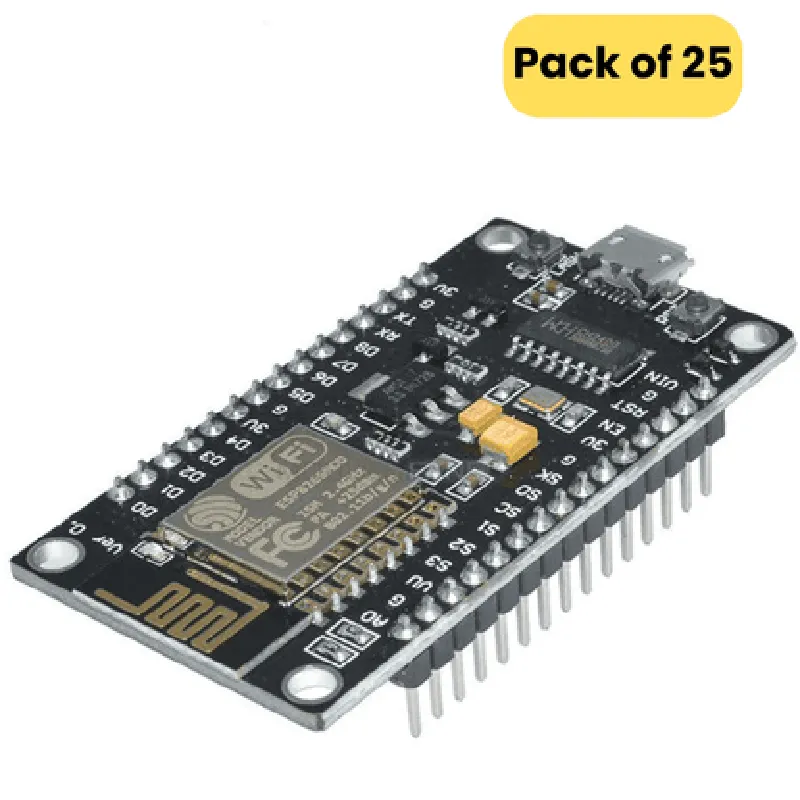
Node MCU ESP8266 V3 (LOLIN CH340 chip) (pack of 25)

Buy Now on Stufin

Pin Configuration

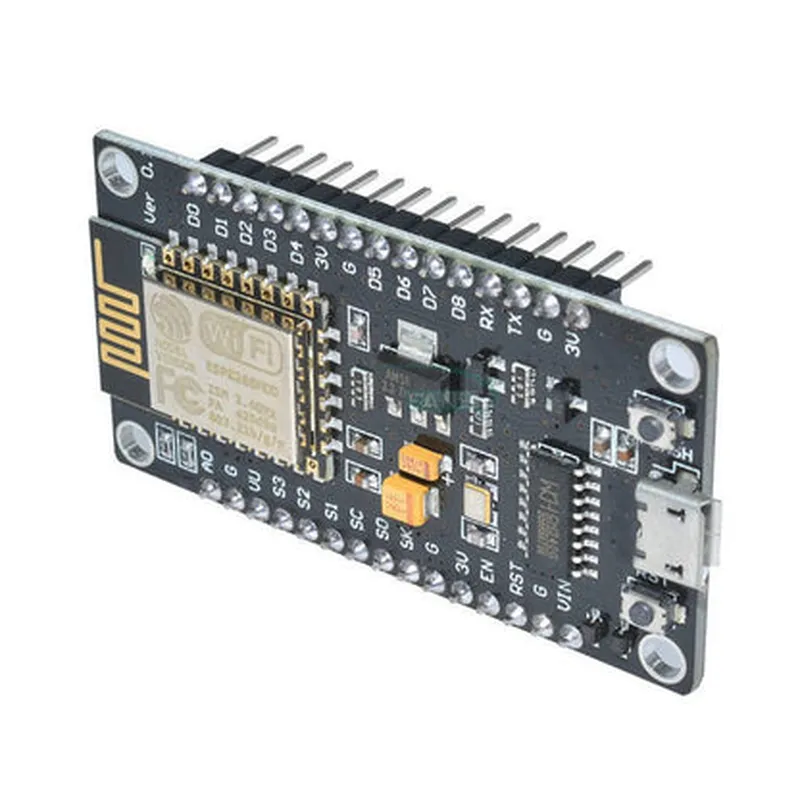
  • Node MCU ESP8266 V3 (LOLIN CH340 chip) Pinout Explanation
  • The Node MCU ESP8266 V3 is a popular microcontroller board based on the ESP8266 system-on-a-chip (SoC) and features a LOLIN CH340 chip for USB-to-serial communication. The board has a total of 30 pins, which are explained below:
  • Digital Pins
  • 1. D0 (TX): This pin is used for serial transmission and is also known as the transmit pin. It can be used as a digital output pin.
  • 2. D1 (RX): This pin is used for serial reception and is also known as the receive pin. It can be used as a digital input pin.
  • 3. D2: A digital input/output pin that can be used for various applications such as buttons, LEDs, or sensors.
  • 4. D3: A digital input/output pin that can be used for various applications such as buttons, LEDs, or sensors.
  • 5. D4: A digital input/output pin that can be used for various applications such as buttons, LEDs, or sensors.
  • 6. D5: A digital input/output pin that can be used for various applications such as buttons, LEDs, or sensors.
  • 7. D6: A digital input/output pin that can be used for various applications such as buttons, LEDs, or sensors.
  • 8. D7: A digital input/output pin that can be used for various applications such as buttons, LEDs, or sensors.
  • 9. D8: A digital input/output pin that can be used for various applications such as buttons, LEDs, or sensors.
  • 10. D9: A digital input/output pin that can be used for various applications such as buttons, LEDs, or sensors.
  • 11. D10: A digital input/output pin that can be used for various applications such as buttons, LEDs, or sensors.
  • Analog Pins
  • 12. A0: An analog input pin that can be used to read analog signals from sensors such as temperature, humidity, or light sensors.
  • Power Pins
  • 13. 3V3: A power output pin that provides a stable 3.3V voltage for external components.
  • 14. GND: A ground pin that provides a common reference point for the circuit.
  • 15. VIN: A power input pin that can be used to connect an external power source (e.g., battery or wall adapter).
  • LOLIN CH340 Chip Pins
  • 16. CH340 TXD: A transmit pin for the CH340 USB-to-serial chip.
  • 17. CH340 RXD: A receive pin for the CH340 USB-to-serial chip.
  • 18. CH340 RTS: A request-to-send pin for the CH340 USB-to-serial chip.
  • 19. CH340 CTS: A clear-to-send pin for the CH340 USB-to-serial chip.
  • ESP8266 Pins
  • 20. EN (Enable): A pin that enables or disables the ESP8266 chip.
  • 21. RST (Reset): A pin that resets the ESP8266 chip.
  • 22. GPIO16: A digital input/output pin that can be used for various applications such as buttons, LEDs, or sensors.
  • Reserved Pins
  • 23. MTDI: A reserved pin for the ESP8266 chip.
  • 24. MTCK: A reserved pin for the ESP8266 chip.
  • 25. MTMS: A reserved pin for the ESP8266 chip.
  • 26. MTDO: A reserved pin for the ESP8266 chip.
  • Unused Pins
  • 27. NC (Not Connected): A pin that is not connected to any internal component.
  • 28. NC (Not Connected): A pin that is not connected to any internal component.
  • 29. NC (Not Connected): A pin that is not connected to any internal component.
  • 30. NC (Not Connected): A pin that is not connected to any internal component.
  • Connection Structure
  • When connecting the pins, make sure to follow the proper structure to avoid any damage to the board or external components:
  • Use a breadboard or PCB to connect the pins to external components.
  • Connect power pins (3V3, GND, VIN) to a power source or a battery.
  • Connect digital pins (D0-D10) to external components such as buttons, LEDs, or sensors.
  • Connect analog pins (A0) to external analog sensors.
  • Connect LOLIN CH340 chip pins (CH340 TXD, CH340 RXD, CH340 RTS, CH340 CTS) to a USB cable for programming and debugging.
  • Connect ESP8266 pins (EN, RST, GPIO16) as required for your specific application.
  • Remember to use a voltage regulator or a voltage divider to ensure that the voltage levels are within the recommended range for the external components.

Code Examples

Node MCU ESP8266 V3 (LOLIN CH340 chip) Documentation
Overview
The Node MCU ESP8266 V3 is a popular microcontroller board based on the ESP8266 system-on-chip (SoC) and LOlin CH340 chip. It is a versatile and affordable IoT development board that supports Wi-Fi connectivity, making it suitable for a wide range of IoT projects.
Hardware Specifications
Microcontroller: ESP8266
 Wi-Fi: 802.11 b/g/n
 GPIO: 13 (including 1x UART, 1x I2C, 1x I2S)
 Flash Memory: 4MB
 SRAM: 96KB
 Operating Voltage: 3.3V
 Input Voltage: 5-12V
 Dimensions: 49 x 24.5 mm
Software Support
The Node MCU ESP8266 V3 is compatible with a variety of programming languages, including C, C++, Lua, and MicroPython.
Code Examples
### Example 1: Wi-Fi Connect and HTTP Client
This example demonstrates how to connect the Node MCU ESP8266 V3 to a Wi-Fi network and make an HTTP request to a web server.
```c
#include <WiFi.h>
#include <HTTPClient.h>
const char ssid = "your_wifi_ssid";
const char password = "your_wifi_password";
const char serverUrl = "http://example.com";
WiFiClient wifiClient;
HTTPClient http;
void setup() {
  Serial.begin(115200);
// Connect to Wi-Fi
  WiFi.begin(ssid, password);
  while (WiFi.status() != WL_CONNECTED) {
    delay(1000);
    Serial.println("Connecting to WiFi...");
  }
Serial.println("Connected to WiFi");
  Serial.println("Initializing HTTP client...");
}
void loop() {
  http.begin(wifiClient, serverUrl);
  int httpCode = http.GET();
if (httpCode > 0) {
    String response = http.getString();
    Serial.println(response);
  } else {
    Serial.println("Error sending request");
  }
http.end();
  delay(5000);
}
```
### Example 2: Blinking LED using MicroPython
This example demonstrates how to use MicroPython to blink an LED connected to GPIO 2 on the Node MCU ESP8266 V3.
```python
import machine
import time
# Set up GPIO 2 as an output
led = machine.Pin(2, machine.Pin.OUT)
while True:
    # Turn on the LED
    led.value(1)
    time.sleep(0.5)
# Turn off the LED
    led.value(0)
    time.sleep(0.5)
```
### Example 3: Reading Temperature and Humidity using DHT11 Sensor
This example demonstrates how to use the Node MCU ESP8266 V3 to read temperature and humidity data from a DHT11 sensor.
```c
#include <DHT.h>
#define DHT_PIN 2
#define DHT_TYPE DHT11
DHT dht(DHT_PIN, DHT_TYPE);
void setup() {
  Serial.begin(115200);
  dht.begin();
}
void loop() {
  float temperature = dht.readTemperature();
  float humidity = dht.readHumidity();
Serial.print("Temperature: ");
  Serial.print(temperature);
  Serial.println(" C");
Serial.print("Humidity: ");
  Serial.print(humidity);
  Serial.println(" %");
delay(2000);
}
```
These examples demonstrate the versatility of the Node MCU ESP8266 V3 and its potential for IoT development. With its Wi-Fi capabilities, GPIO pins, and support for various programming languages, this board is an ideal choice for a wide range of projects.